


Tip Calculator
4.83.44K Reviews
App Specs
- Version
- 3.1.1
- Updated On
- License
- Free
- Downloads
- 500,000+
- Developer
- Skol Games LLC
- Categories
- Food & Drink
- Platform
- Android, iOS
Screenshots
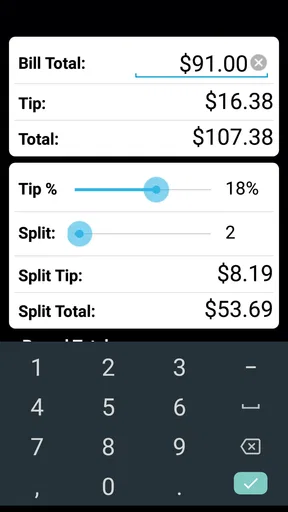
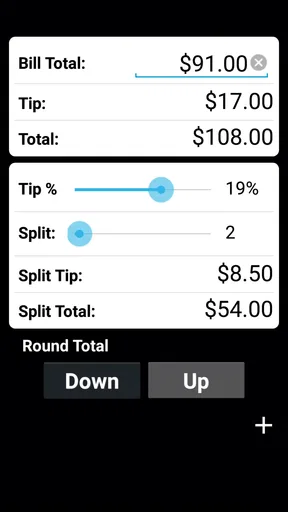
 Analysis by AppCompare
When the bill lands in the middle of a lively table, I’d rather keep the conversation going than pause to do percentage math. That is where Tip Calculator can help: it turns a quick decision about the tip and each person’s share into a small, focused task. I find it most useful when I know what I want to calculate and need a clear answer without opening a spreadsheet or searching for a general-purpose calculator.
A quick routine for the bill
I like to make the bill routine deliberate rather than rush through taps: settle which amount is being shared, choose the tip, and check who is actually splitting it before using the per-person figure. That small pause is especially useful when one guest has paid for something separately. From there, the next section looks at the choices worth checking so the result reflects the group’s agreement, not just the quickest calculation.
Start with the amount, then choose the tip
My basic routine is straightforward: enter the bill, choose a percentage, and check the resulting total before deciding how to pay. The app is a free Food & Drink app from Skol Games LLC, and its purpose is narrow by design. It is rated for Everyone, has a 4.8 average from around 12,000 ratings, and has been installed over 500,000 times. Those figures suggest that plenty of people want a dedicated tool for this small but recurring moment.
For a quiet meal alone, I can use the calculation to sanity-check my own mental arithmetic. With a group, splitting the amount after adding a tip is more practical than asking everyone to estimate a share separately. One useful habit is to agree on the tip percentage first, then use the same calculation as the reference point for the table. That avoids a familiar muddle where one person divides the pre-tip amount while another assumes the tip is already included.
Make the calculation fit the way your group pays
The split option is especially handy when everyone is paying an equal share. It is less suited to a table where one person ordered much more than the others, or where people want to settle separate items. In that case, I would use the app for the tip calculation on the appropriate subtotal, then handle the uneven split separately. A dedicated tip tool keeps the arithmetic quick, but it cannot decide what feels fair between diners.
For example, after a shared dinner, I’d first settle on whether the tip should be based on the whole bill or on a particular subtotal, then enter the amount and divide the tipped total among the people paying evenly. If a friend has already covered drinks separately, I would not treat the simple equal split as the final answer for that person. A short check of who owes what still matters; the calculator can remove percentage arithmetic, not replace the group’s agreement.
Settings and habits worth checking
When I use any bill-splitting calculator, I check whether its selected percentage and split count match the situation before sharing the result. Here, the useful choices described for the app include standard tip percentages and a custom percentage, so I can keep a familiar setting for an ordinary meal or adjust it when I have a reason to do so. Rather than treating a suggested percentage as a rule, I see it as a starting point that should reflect the service, local expectations, and my own judgment.
Worth Reading Before You Choose

EA SPORTS FC Mobile 26 Is a Bigger Football Game, but It Takes Time

Flipboard Shows What News Apps Must Do Beyond the Feed

Switching to Android Auto Means Rethinking Your Driving Routine

Google Calendar Makes a Crowded Week Easier to Manage

Ludo King Makes the Most of the Minutes Between Plans

Baby Panda World Brings Quick Play to Modern Phones, but Its Game Library Feels Busy
A repeatable workflow makes the app more useful than tapping around in a hurry: enter the amount, set the percentage, verify the number of diners, and read the per-person result aloud before anyone pays. That last check catches a simple but common mistake—counting the people at the table rather than the people actually sharing that bill. If the group changes its mind about the tip, I would update the percentage and confirm the new total rather than rely on a remembered figure.
Where a dedicated tool beats a general calculator
A phone’s built-in calculator can handle a tip if I know the formula, and a quick web search may be enough when I only need a one-off answer. The advantage of a purpose-built option is convenience: the task is already framed around tipping and splitting, so I do not need to set up the arithmetic each time. That distinction matters most when conversation is moving, the bill is in front of me, and I want to avoid punching in the wrong operation.
On the other hand, a general calculator is a better fit if I need to divide costs by item, account for different orders, or combine several unrelated expenses. I would not choose a basic tip calculator as a full group-expense tracker. Its focused approach is a strength for a simple restaurant bill and a limitation as soon as the settlement becomes complicated.
Repeat visits, travel, and practical limits
Saving recent calculations can be helpful if I want to check a past amount or keep my own tipping choices consistent from one visit to another. I would use that as a personal reference, not as a record of what every diner paid. Before relying on an old calculation, I’d check that it belongs to the meal I have in mind and that the group size and tip percentage still make sense.
The app can work without an internet connection, which is a useful quality when I am traveling or dining somewhere with unreliable data. Still, the local rules and customs around tipping vary, so an offline calculation only answers the math question; it cannot tell me what is expected in a particular place. I would decide on an appropriate percentage first, then let the app handle the arithmetic.
There are trade-offs. A dedicated calculator is only as useful as the figures I enter, and an equal split can create a misleading answer when orders or payment arrangements differ. I also would not assume a saved calculation is a complete expense history. The best way to use it is as a quick helper at the table, with a brief human check before the group settles up.
Who will appreciate it—and who may not
I’d recommend this app to people who dine out with friends, want a fast way to divide a tipped total evenly, or simply prefer not to calculate percentages in their heads. It also suits travelers who want an offline way to do the arithmetic, provided they already know the local tipping expectations. Its uncomplicated focus is a good match for someone who wants a small utility rather than a broader budgeting or expense-sharing system.
I would skip it if I usually split by individual dishes, need to track who has paid across several outings, or want a tool to manage a complicated bill with different arrangements. A standard calculator or a dedicated shared-expense app may be a better choice in those situations. The right option depends less on the size of the tip than on how complicated the group’s settlement is.
What to expect before installing
The app is free to download, with in-app purchases listed at between $2.99 and $7.99 per item. Its current version is 3.1.0 and it requires Android 9 or later. I would check that my device meets that requirement before trying to install it. The long-running release history and its 3.4K reviews give prospective users some context, but the most important question is still whether its focused workflow matches how they pay at restaurants.
For someone who only needs a tip calculation once in a while, a built-in calculator may be enough. For someone who repeats the same simple routine at meals, a dedicated app can reduce friction. I’d make the choice based on that difference rather than expecting a tip tool to solve every kind of shared spending.
Getting Started with Tip Calculator
First things first, downloading the app is as easy as pie. It’s available for Android and iOS, so you can find it in your app store with a quick search. Once installed, it greets you with a clean and straightforward interface. No frills, just functionality, which is exactly what you want when you're staring at a restaurant bill after a hearty meal.
Opening the app, you're welcomed with a minimalistic design that’s surprisingly refreshing. The home screen presents a simple input field for your bill amount. No overwhelming options or confusing buttons—just a clear space to type in your total. It’s like the app knows you might be a little groggy after all that pasta.
The Nitty-Gritty of Tipping
Once you've entered the bill amount, the app gets down to business. You can select your desired tip percentage, whether you're feeling generous or keeping a close eye on your budget. It offers standard options like 10%, 15%, and 20%, but if you’re inclined to tip an odd amount, there’s a custom option too. Just slide the bar to your preferred percentage and watch the magic happen.
One feature I particularly enjoyed is the split bill option. Dining out with friends? No problem. The app allows you to divide the total amount (including the tip) by the number of diners. This feature is a lifesaver for group outings, preventing those awkward moments when everyone's trying to figure out who owes what. It’s efficient, and frankly, a breath of fresh air.
User Experience and Design
The app keeps things simple, and that's its charm. There are no ads popping up at every tap, which is a huge win in my book. The app’s focus on delivering a seamless experience is evident. It’s designed for quick access, making it an ideal companion for those dining moments when time is of the essence.
It even has a dark mode, which seems to be all the rage these days. Not only does it save battery life, but it also reduces eye strain during those late-night dinner runs. Plus, it just looks really cool, let’s be honest.
Additional Perks
One little gem within the app is its ability to save your recent calculations. If you're like me and enjoy going back to check how much you tipped last night (just to pat yourself on the back for your generosity), this function is surprisingly useful. It’s also handy if you frequent the same spots and like to maintain consistency in your tipping habits.
The app doesn’t require an internet connection, which is perfect for international travel when data can be spotty. It’s reliable, whether you’re dining at a bustling city restaurant or a quaint countryside café.
Final Thoughts
All in all, the app is a must-have app for anyone who dines out regularly. Its simplicity, coupled with practical features, makes it a no-brainer addition to your smartphone. It’s like having a little math-savvy friend in your pocket, always ready to help when the bill arrives.
So next time you’re out to eat, let Tip Calculator do the heavy lifting. You focus on enjoying your meal and leave the math to this delightful app. Happy dining!
Pros
- Easy-to-use interface simplifies calculations.
- Supports multiple currencies for travelers.
- Customizable tip percentage settings.
- Splits bills among multiple people easily.
- Real-time calculation updates as you input values.
Cons
- Ads can be intrusive and distracting.
- Limited theme customization options.
- No offline functionality available.
- Some features locked behind a paywall.
- Occasional bugs with currency conversion.
FAQs for Tip Calculator
What is the Tip Calculator app used for?
The Tip Calculator app is designed to help users quickly and accurately calculate the amount of gratuity to leave at a restaurant or service establishment. It allows users to input the total bill amount, select a desired tip percentage, and even split the bill among multiple people. This ensures a fair and easy division of costs.
Does the Tip Calculator app support multiple currencies?
Yes, the Tip Calculator app typically supports multiple currencies, making it ideal for travelers or users dining in different countries. It automatically adjusts to the local currency based on your location, allowing for seamless calculations no matter where you are dining.
Is the Tip Calculator app easy to use for beginners?
Absolutely, the Tip Calculator app is designed with user-friendliness in mind. The interface is intuitive and straightforward, requiring only basic inputs like the bill amount and desired tip percentage. Even if you’re not tech-savvy, you’ll find it easy to navigate and use effectively.
Can I adjust the tip percentage with the Tip Calculator app?
Yes, the Tip Calculator app allows you to adjust the tip percentage to suit your preferences or local customs. Users can choose from preset percentages or enter a custom amount. This flexibility ensures that you can always leave an appropriate tip, regardless of the situation.
Is the Tip Calculator app available for both Android and iOS?
The Tip Calculator app is available for both Android and iOS platforms. This ensures a wide range of compatibility across different devices, allowing users to access its features whether they are using a smartphone or a tablet. You can download it from the Google Play Store or Apple App Store.


